A Snapchat geofilter is the familiar name for a branded camera overlay associated with a place or event. Snapchat’s current paid option is called a Sponsored AR Filter. It is created with Lens Web Builder, selected under Camera placement in Ads Manager and shown to the audience chosen for the campaign.
The creative still needs to earn its place in the photo. People are more likely to use a filter that identifies the occasion, improves the frame or gives them a simple interaction. A large logo with no useful idea is easy to ignore.
Sponsored AR Filters on Snapchat
Short answer: Snapchat now calls the paid camera format a Sponsored AR Filter. Build a simple filter in Lens Web Builder, save it to your Lens Folder, then choose Camera and AR Filter when setting up the campaign in Ads Manager. Targeting, schedule and auction conditions determine the media cost.
A Sponsored AR Filter can support a product launch, store opening, conference or event. It works best when the design tells viewers where the person is or gives them something interesting to do with the camera.
How to create the current format
Snapchat says advertisers can create a Sponsored AR Filter in Lens Web Builder and then publish it through Ads Manager. Confirm the available placements and targeting inside the account because platform controls can change.
Some ways you can use the geofilters are:- Support Your Personal Brand
- Announce New Product Launches
- Trade Shows Awareness
- Support an approved venue or event campaign
- Share Company Culture
- Announcing special offer or discount
How much does a sponsored Snapchat filter cost?
There is no single rate that applies to every filter campaign. Review the live estimate in Ads Manager using the actual audience and dates. Cost is affected by:
- The audience and locations selected
- The campaign schedule and auction competition
- The objective, bid and delivery settings
- Whether the creative uses a simple template or custom AR production
Do not carry an old blog price into a proposal. Build the audience in Ads Manager, record the estimate and confirm it again before launch.
The result should be judged against the campaign goal. Track filter plays and shares for participation, then use a separate measurable action if the business needs visits, leads or sales. Review the Snap advertising policies before submitting creative.
Planning the audience and getting the filter approved
Two practical decisions affect the campaign before it goes live.
The audience. Choose locations and people that match the event or offer. A broad audience can spend budget on people who have no reason to use the filter.
The approval. Submit early enough to correct rejected artwork. Do not promise a review time until Ads Manager shows the current guidance for the account.
What gets filters rejected most often:
- Phone numbers, URLs and email addresses. A geofilter is a brand overlay, not a direct response ad.
- Photographs, and logos that cover too much of the frame. The snap is the content; your filter is the border around it.
- Hashtags and anything that reads as a call to action.
- Artwork without transparency. A filter that blocks the photograph will not be used even if it is approved.
The design rule follows from all of this: people apply a filter because it says something about where they are, not because it advertises you. A filter that makes someone’s snap look better gets used, shared and seen by their friends. One that looks like an ad gets swiped past.
How to design a Snapchat filter people will use
A geofilter only works if people choose to add it to their Snap, so the design matters more than anything else. A few things that help:
- Keep it simple and leave the middle clear, since people are putting themselves in the frame.
- Tie it obviously to the place or event, with a venue name, a date, or a local landmark.
- Use your brand colours and logo, but lightly, so it feels like fun rather than an ad.
- Keep direct-response details in the accompanying campaign rather than covering the camera view.
Good creative gives the user a reason to choose the filter. We can plan the idea, prepare the assets and set up the paid campaign.
Our experience with Snapchat geofilters
We tried our first Snapchat Geofilter Ads and it was approved after a few rejections. Good creativity goes a long way.
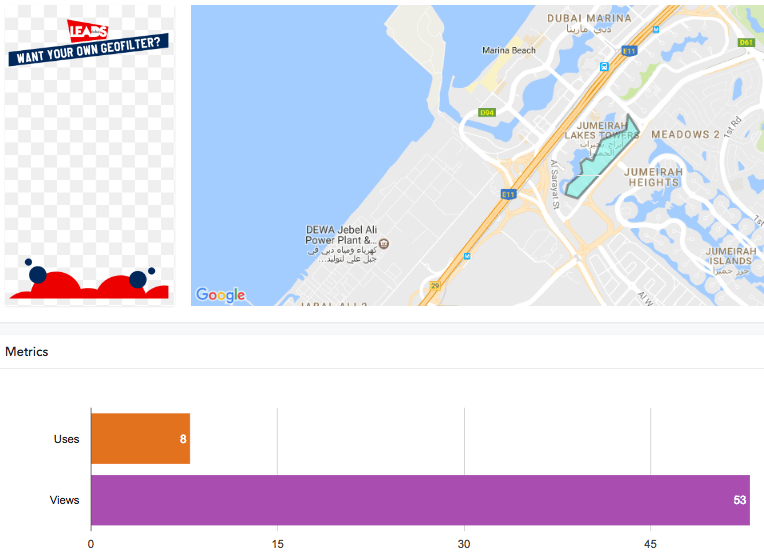
Snapchat reports two numbers for your geofilter: uses, how many times people added it to a Snap or Story, and views, how many times a Snap carrying your filter was seen. Metrics can lag up to 24 hours, and Wi-Fi-connected devices are more likely to see your filter than those on a weak mobile signal, since location accuracy varies.
Current setup checklist
- Create the filter in Lens Web Builder and save it to the Lens Folder.
- Choose Camera and AR Filter in Ads Manager.
- Check the live targeting, schedule, budget and review requirements.
- Test the camera experience before the event or launch date.
See all our Snapchat ad formats, including Snapchat Lenses ads. Thinking of sharing your story? Contact us to do your sponsored Snapchat advertising