What is a WhatsApp Community?
Short answer: a WhatsApp Community groups related chats under one umbrella, with an announcement group for admin updates. In the standard WhatsApp app, start a new Community from Chats, add its name and description, then create or link groups. WhatsApp currently does not let users create one inside the WhatsApp Business app.
A WhatsApp Community brings related groups together, so a neighbourhood, school, workplace or member organisation can organise conversations by topic while admins still reach everyone through one announcement group. It is useful when one large chat has become noisy, but it is not a substitute for permission-based business broadcasts or customer support software.
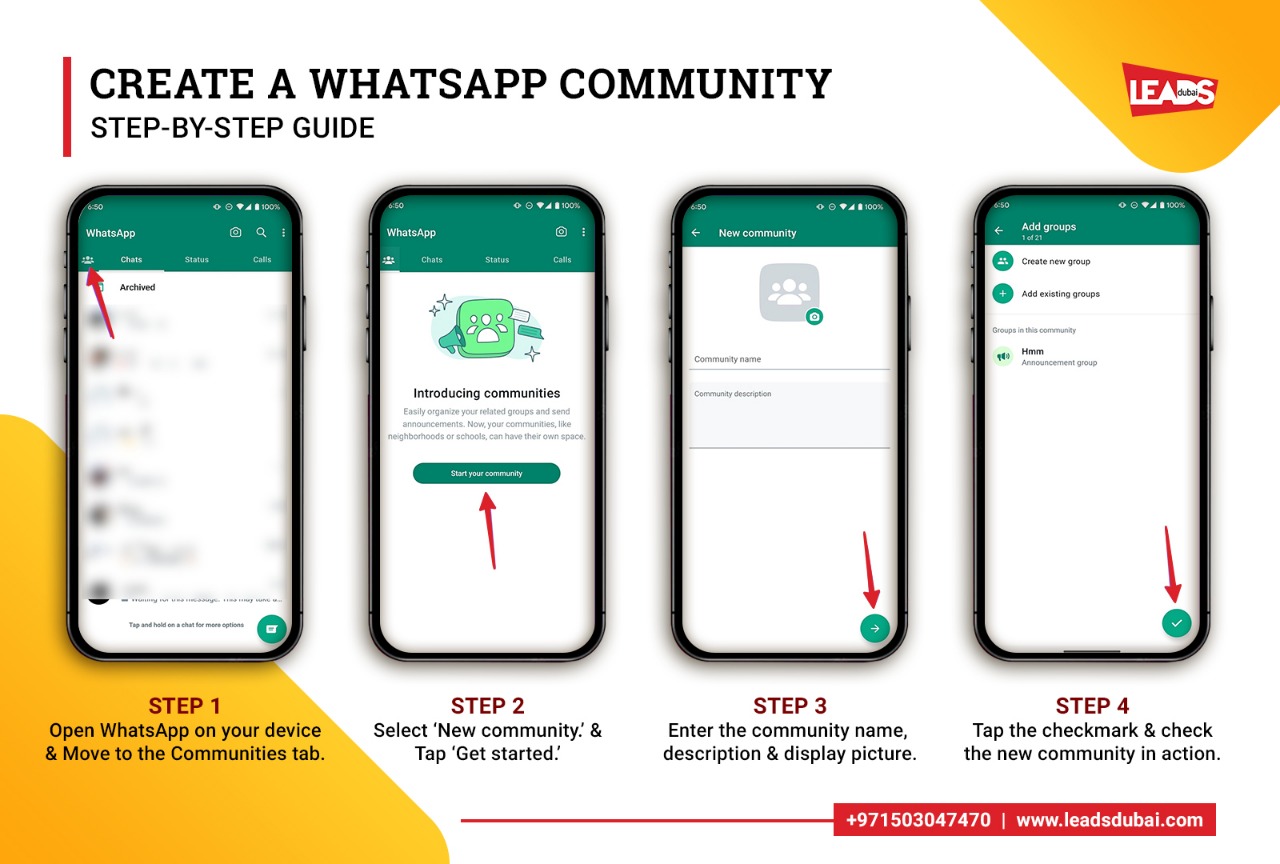
How to create a community on WhatsApp
- Open the standard WhatsApp app and go to Chats.
- Choose New community, then add a name, a short description and an icon.
- Add groups. Create new groups inside the Community or add existing ones. Every Community gets an announcement group automatically, where only admins post and every member receives the update.
- Invite members with a link or by adding contacts. People join the announcement group first, then join the topic groups that are relevant to them.
- Set admin controls and simple community guidelines so the space stays useful and on topic.
WhatsApp currently allows up to 100 groups and 2,000 members across a Community and its announcement group. It is not currently possible to create a Community in the WhatsApp Business app, although Business app users can engage with Communities they already belong to.
Once it is set up, members switch between the topic groups they care about, while admins send important updates to everyone at once through the announcement group.

WhatsApp Community features worth using
- Announcement group to broadcast to every member at once.
- Topic groups so conversations stay organised.
- In-chat polls to gather quick feedback and decisions.
- Larger group video calls and larger file sharing.
- Admin tools like message delete, member controls and guidelines.
- Emoji reactions to keep big groups readable.
Who should build a WhatsApp Community?
Communities work well for schools and parent groups, clubs and associations, residential neighbourhoods and workplaces. If you already run several related groups, a Community keeps them connected and reduces repeated admin messages. A business should first check the Business app limitation and decide whether a Channel, opted-in broadcast or customer-service inbox better fits the job.
Tips for running a healthy community
- Set clear guidelines and pin them in the announcement group.
- Keep the announcement group for updates only, and let discussion happen in the topic groups.
- Add a few trusted admins to help moderate.
- Post consistently but not constantly, so members stay subscribed.
For a business, a Community pairs well with the rest of your WhatsApp toolkit. If you need help planning the groups, permissions and customer journey, see our WhatsApp marketing services. We can help set up the channel and connect it with automation and customer service.
Related: our guide to WhatsApp marketing strategy, WhatsApp ads in Dubai, and WhatsApp marketing software.