Part of our complete guide to email marketing strategies.
If you run email from Gmail, you can add marketing muscle without leaving your inbox. The solutions fall into a few types:
- Scheduling and follow-ups, so emails go out at the right time and nothing slips through the cracks, which is what Boomerang below does.
- Mail merge tools like GMass or Yet Another Mail Merge, for sending personalised emails to a list straight from a spreadsheet.
- A light CRM like Streak that lives inside Gmail to track leads and deals.
One thing to keep in mind: Gmail is built for personal and small-team sending, with a daily send limit of a few hundred messages, so for large campaigns you still want a proper email platform. For scheduling, reminders and follow-ups, Boomerang is one of the most popular free options, and here is how it works.
Email marketing solutions on Gmail with Boomerang. Schedule emails & send reminders.
Short answer: Gmail can work for a small permission-based list or personal follow-ups. Move to a proper email platform when you need automated consent records, one-click unsubscribe, segmentation, bounce handling and campaign reporting. Sending limits are not the only issue. Recipient expectations and deliverability matter too.

Send an email later
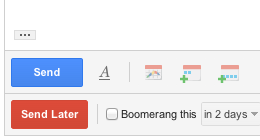
With Boomerang, you can write an email now and schedule it to be sent automatically at the perfect time. Just write the message as you normally would, then click the Send Later button. Use our handy calendar picker or our text box that understands language like “next Monday” to tell Boomerang when to send your message. We’ll take it from there.
The best follow-up reminders
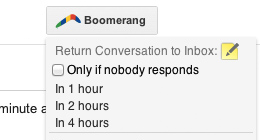
Want a cleaner inbox, but don’t want to lose track of important messages? Use Boomerang to take messages out of your inbox until you actually need them. Just click the Boomerang button when you have an email open, and choose when you need it again. Boomerang will archive the message. At the time you chose, we’ll bring it back to your inbox, marked unread, starred, or even at the top of your message list.
Remind you if you don’t hear back
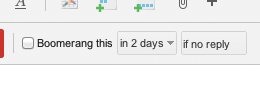
There are times you need to make sure you follow up within a specific time frame after sending a message. You can select to only be reminded if nobody replies, or regardless. This way you won’t let messages slip through the crack and will never forget to follow up with people.
Now available for mobile!
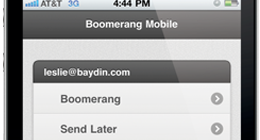
Have you ever been out at dinner and remembered that you need to do something when you get to the office tomorrow morning? Now you can write an email while you’re on the go, and have it arrive exactly when you need to be reminded, like 8 AM the next morning.
Before you send a campaign from Gmail
Use a business domain, authenticate it and send only to people who have a valid reason to receive the message. Gmail requires SPF or DKIM for all senders to personal Gmail accounts. Higher-volume senders have further requirements, including SPF, DKIM, DMARC alignment and one-click unsubscribe for marketing messages.
If you need consent management, automated journeys or reliable reporting, use a dedicated platform and connect it to your CRM. Leads Dubai can help review the list, sending setup and landing page as part of an email marketing campaign.