The Facebook Pixel is the foundation of effective Facebook ads
Short answer: the Facebook Pixel, now called the Meta Pixel, is a snippet of code on your website that reports what visitors do after they click your ad. It powers conversion tracking, retargeting, lookalike audiences and dynamic ads. Since browser tracking became unreliable, most accounts now pair it with the Conversions API.
The Facebook Pixel (now the Meta Pixel) is a small piece of code you place on your website to track what people do after they see or click your ad. Without it, you are advertising blind. With it, you can measure real conversions, build powerful audiences, retarget visitors, and let Meta optimise toward the people most likely to buy.
What the Meta Pixel does
- Tracks conversions. See how many people took action on your site after viewing your ad, and which ad, audience and creative produced them.
- Builds custom and lookalike audiences. Create audiences from your visitors, then find new people who resemble your best customers.
- Powers retargeting. Show ads to people who visited but did not convert, your warmest and highest-converting audience.
- Improves optimisation. Feeds Meta the signals it needs to deliver ads to people likely to take your desired action, which lowers your cost per result.
Standard events to track
The Pixel is made of a base code on every page, plus event codes for the specific actions that matter. The common standard events are:
- PageView (fires automatically with the base code)
- ViewContent (product or key pages)
- Search
- AddToCart and AddToWishlist
- InitiateCheckout and AddPaymentInfo
- Purchase
- Lead (form submissions and enquiries)
- CompleteRegistration
How to install the Meta Pixel
- Create the Pixel in Meta Events Manager.
- Add the base code to the header of every page, between the <head> and </head> tags.
- Configure standard events on the relevant pages or actions.
- Set up custom events for anything specific to your business.
- Test with the Meta Pixel Helper Chrome extension.
- Confirm events are arriving in Events Manager.
- Add the Conversions API for reliable, privacy-resistant tracking.
What Apple’s tracking prompt changed
Everything above works less well than it used to, and it is worth knowing why before you judge your numbers.
Since iOS 14.5 in April 2021, Apple has required apps to ask permission before tracking users across other companies’ apps and sites. A large share of people decline. For advertisers that means the Pixel alone now misses a meaningful slice of conversions, attribution windows shortened, and reported results sit below what actually happened.
Three consequences you have to work around:
- Verify your domain. Until you verify it in Business Manager, you cannot configure conversion events for it at all. This is the step most accounts skip and then wonder why events are unavailable.
- You get eight conversion events per domain. Aggregated Event Measurement caps it, and you rank them in priority order. Only the highest-priority event a person completes gets reported, so put the one that matters commercially at the top rather than tracking everything you can think of.
- Expect under-reporting, and stop comparing platforms directly. Meta will show fewer conversions than your CRM or Google Analytics. That gap is measurement, not campaign failure. Judge performance on your own recorded revenue and treat the platform number as directional.
Why the Conversions API is now essential
Since the iOS 14 privacy changes, browser tracking alone misses a large share of events, which weakens your data, attribution and optimisation. The Conversions API (CAPI) fixes this by sending events from your server straight to Meta, alongside the browser Pixel. The result is more reliable data, better retargeting, and higher optimisation quality. You can set it up through native e-commerce integrations (Shopify, WooCommerce), a server-side implementation, or a partner tool. For any serious advertiser, running the Pixel and CAPI together is no longer optional.
Send the same event twice, deliberately
When you run the Pixel and the Conversions API together, both report the same purchase. That is intended, but only if you tell Meta they are the same event.
Pass a matching event ID from both sources and Meta deduplicates them, counting one conversion rather than two. Miss that and your reporting inflates, your cost per conversion looks better than it is, and the bidding optimises on fiction.
While you are there, send as much customer information as you legitimately hold with each server event: email, phone, name, location, all hashed. Meta scores this as Event Match Quality, and a higher score means more conversions correctly attributed. It is the single most useful dial most accounts never touch.
Dynamic ads: the Pixel put to work
Once the Pixel is tracking shopping actions, dynamic ads automatically show each person the exact products they viewed or added to cart, pulled from your catalogue with live pricing and stock. They personalise at scale, which is why they deliver some of the highest returns of any Facebook format for e-commerce, and they also work for real estate property matching, hotel and travel inventory, automotive stock, job listings and course matching.
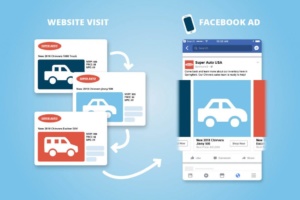
Setting them up is a short, one-time job:
- Create a product catalogue in Commerce Manager and connect your product feed.
- Check the catalogue for quality: correct titles, images, prices and stock.
- Make sure the Pixel is firing the shopping events (ViewContent, AddToCart, Purchase).
- Build a dynamic campaign with a creative template that pulls from the catalogue.
- Choose retargeting (people who browsed) or prospecting (lookalikes of your buyers).
- Monitor and optimise. After that, the catalogue keeps every ad updated on its own.
Leads Dubai is a lead generation agency in the UAE. Talk to us about our social media marketing, Facebook ads and Instagram ads that help our clients win with social.