 Training guide
Maximizing Efficiency with Marketing Automation
What marketing automation gives you, how to set it up properly, the five mistakes that waste the investment, and the email sequence that converts subscribers.
Five ways automation goes wrong
In short: marketing automation is software deciding who gets which message and when, so the repetitive follow-ups stop being somebody's afternoon. It pays off when the goal is defined, the list is clean and the platform talks to your CRM. It fails when teams automate before deciding what outcome they want, then cannot tell whether it worked.
Buying the platform is the easy part. These are the failures that turn it into an expensive contact list:
- No clear goal. Teams automate before deciding whether they want more leads, better retention or fewer manual tasks, then cannot tell whether it worked. Pick one outcome and build the first workflow for that.
- Over-automating. Automate the repeatable and keep a human on anything that needs judgement. A prospect who replies with a real question and gets the next scheduled email is a lost prospect.
- Dirty data. Automation applied to a stale list sends the wrong message to the wrong people, faster and at scale. Clean and validate before you switch anything on.
- Running it in isolation. If the platform does not talk to your CRM and your website, you get a fragmented view and sales never sees what marketing saw.
- Never testing. Launching once and leaving it is the most common version of this. Test subject lines, calls to action and timing, and revisit workflows that have been running untouched for a year.
The email sequence that actually converts
Most automation value sits in one place: turning a subscriber into a customer. The sequence that works is shorter than people expect.
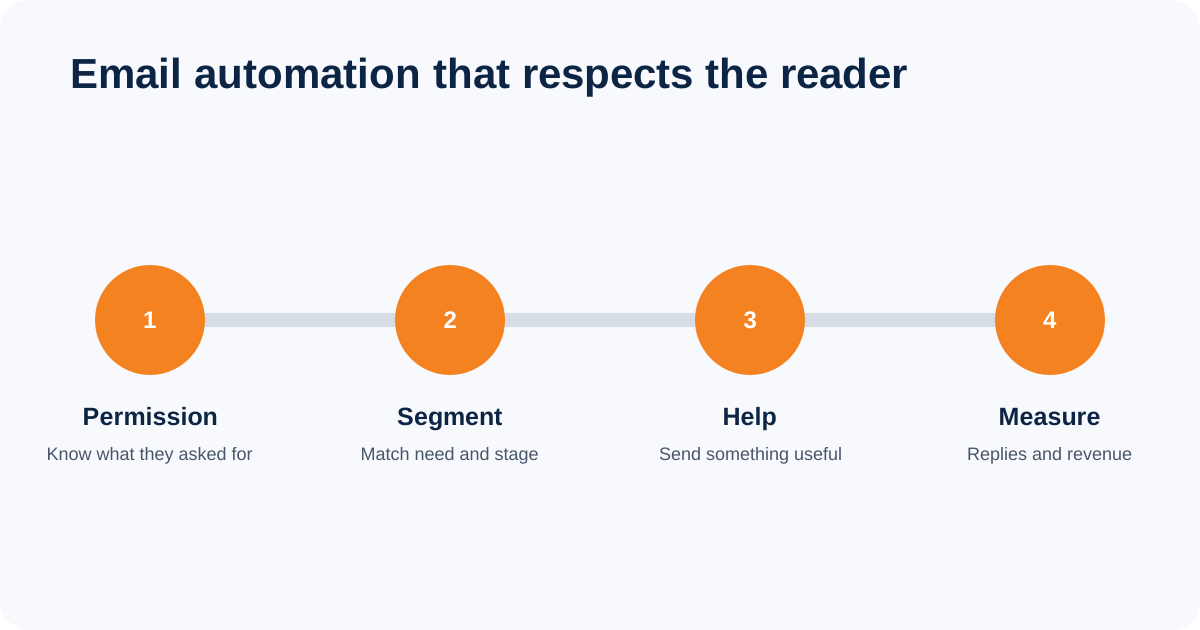
- 1. Understand why they subscribed. What they downloaded or asked for tells you what they want next. Send that, not your newsletter.
- 2. Segment the list. Even two segments beat one. Someone comparing prices and someone learning the basics should not get the same email.
- 3. Get the welcome email right. It is opened far more than anything that follows. Deliver what was promised, set expectations, and give one clear next step.
- 4. Build a real sequence. Three to five emails that move from useful to relevant to an offer, spaced out, rather than a discount on day one.
- 5. Measure replies and revenue. Open rates have become unreliable since Apple Mail Privacy Protection. Judge on clicks, replies and sales.
People who do not buy immediately are not automatically lost. Keep sending information that matches what they asked for, and stop when they withdraw consent or the messages are no longer relevant.
Email engagement is relevance, not open rate
Segment by what the person asked for, write a subject line that describes the message honestly and send at a frequency the content can justify. Apple Mail Privacy Protection makes open rates unreliable as an absolute measure, so compare the trend and make decisions from clicks, replies, booked calls and revenue. Remove consistently inactive contacts after a re-engagement attempt, because poor engagement also harms deliverability.
Build one useful workflow first
Start with a workflow your team already repeats by hand. A new enquiry is a good example: acknowledge the request, record the source and subject in the CRM, assign an owner, alert that person, and stop the sequence when a human replies. Draw those steps before choosing triggers or writing emails.
- Define the entry condition. State exactly what places a contact into the workflow, such as submitting one named form.
- Set the exit conditions. A reply, booking, purchase, unsubscribe or sales-status change should prevent irrelevant follow-ups.
- Keep the first sequence short. Two or three useful messages are easier to check than a twenty-step journey nobody understands.
- Test every path. Use test contacts for the expected route, an unsubscribe, a duplicate submission and a sales reply.
- Name an owner. Someone must review failures, stale copy and performance after launch.
Measure the business result, not activity
A send count proves that the software ran. It does not prove that the workflow helped. Track the outcome tied to its job: qualified replies, booked calls, completed purchases, renewals, or manual hours removed. Record website and form actions as events in GA4, then mark only the actions that matter as key events. The CRM should remain the source for lead status and revenue.
FAQs
What is the difference between email marketing and marketing automation?
Email marketing is a channel. Marketing automation is the system that decides who gets which message and when, across email and often SMS, WhatsApp, ads and your CRM. Email is usually where a team starts, and automation is what it grows into.
How big does my list need to be before automation is worth it?
Smaller than most people assume. If you are manually sending the same follow-up more than a few times a week, automation already pays for itself in time. The list size matters less than how repetitive the work is.
Are open rates still a useful measure?
Not on their own. Apple Mail Privacy Protection pre-loads images, which registers opens that never happened, so the number is inflated and uneven across audiences. Use it for trend only, and judge campaigns on clicks, replies and revenue.
What are the rules on email marketing in the UAE?
The UAE Personal Data Protection Law governs the processing of personal data. Consent, notices, opt-outs and cross-border rules depend on the people contacted and where the sender operates, so do not treat one generic checklist as legal advice. Record how permission was obtained, identify the sender clearly and make withdrawal straightforward.
Which automation platform should I start with?
Whichever one your team will actually use, and which connects to the CRM you already have. Most businesses use a fraction of what they pay for, so the deciding question is not which platform has more features but which one someone in the building can run well.