 Training guide
How to Conduct a Digital Marketing Audit
A step-by-step digital marketing audit: what to check across search, paid, social, content and tracking, in what order, and what to do with what you find.
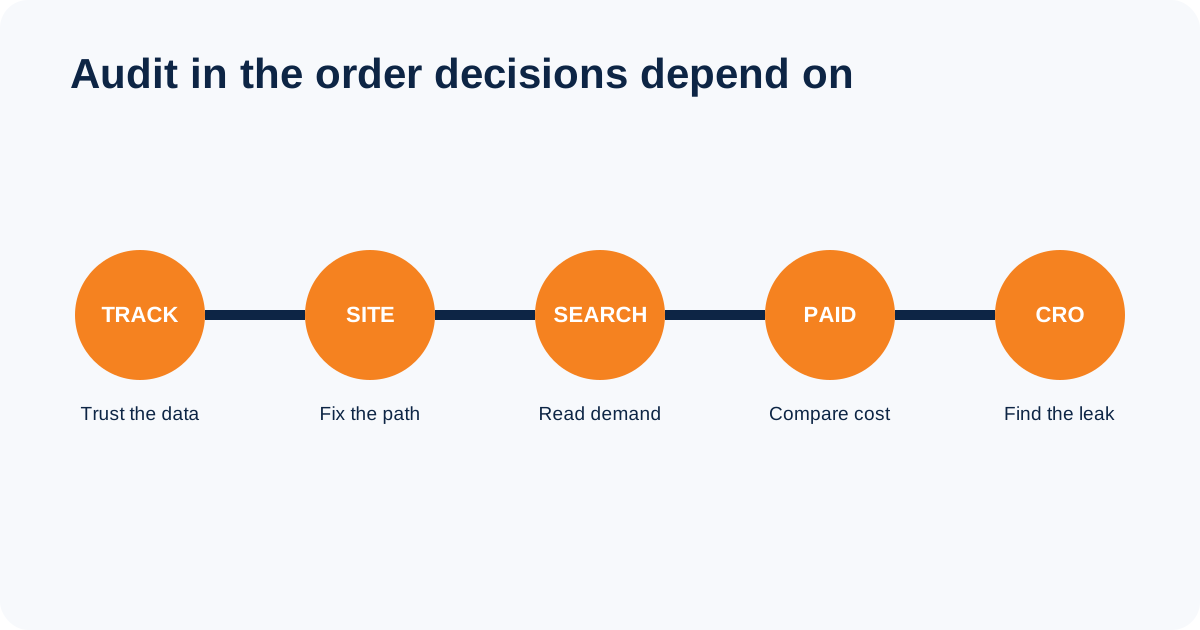
In short: a digital marketing audit checks five things in order: whether tracking is recording correctly, whether the site can be crawled and indexed, what search demand you already earn, how paid and organic are performing against cost per enquiry, and where visitors drop out. Fix the tracking first, because every other finding depends on it.
A digital marketing audit checks whether tracking records real customer actions, whether people can find and use the website, which channels produce qualified enquiries or sales, and where money or attention is being wasted. Start with measurement. If the form, phone tracking, CRM or analytics setup is wrong, every channel conclusion built on that data may also be wrong.
What to collect before the audit
Choose a comparison period long enough to cover the normal sales cycle. Collect channel spend, analytics access, Search Console data, CRM outcomes, call records, campaign change history and the business targets used to judge performance. Keep the raw export. Screenshots lose filters and cannot be checked properly later.
- The business goal and the action that represents it
- Website, tag manager, analytics and Search Console access
- Advertising spend and conversion data by campaign
- CRM records showing qualified leads, sales and rejected enquiries
- Email and social reports for the same period
- A list of major site, campaign and tracking changes
1. Test measurement before reading reports
Complete the journey yourself on desktop and mobile. Submit each important form, tap the phone and WhatsApp links, complete a purchase if relevant, and confirm that the action reaches the correct inbox or CRM. Then confirm that analytics records it once with the right name and source. A tag firing in a browser is not enough if the lead never reaches the sales team.
Use GA4 DebugView or Tag Assistant while testing. Google describes DebugView as a real-time view of the events and user properties collected from a debug-enabled device. Record the test lead so it can be removed from sales reports afterward. See Google’s DebugView instructions.
2. Audit the website and conversion path
- Message match: does the landing page continue the promise made by the ad, search result or social post?
- Clarity: can a new visitor understand the service, location, price basis and next step without prior context?
- Friction: remove fields and steps that are not needed to respond to the enquiry.
- Mobile use: check text, buttons, forms, menus and sticky elements on a real phone.
- Performance: compare PageSpeed Insights field data with its lab diagnostics instead of treating one Lighthouse run as the user experience.
PageSpeed Insights reports both real-user field data from the Chrome User Experience Report and controlled Lighthouse lab data. Field data is better evidence of what visitors experience; lab data helps diagnose what to fix. Read how PageSpeed Insights data works.
3. Check organic search and content together
Confirm that important pages return a successful status, allow indexing, use the intended canonical and appear in the XML sitemap. Check redirects for chains and destinations that do not match the old page. Then use Search Console to compare queries, pages, clicks, impressions and click-through rate. Look for pages receiving impressions for the wrong intent, several pages competing for one query, and useful pages that cannot be reached through internal links.
Search Console assigns most performance data to the canonical URL, so a merged or duplicate page may not retain a separate row. Compare by page and query, and focus on trends in clicks and impressions rather than reacting to one average-position figure. Google explains the Performance report here.
4. Review paid advertising against qualified outcomes
Start with the conversion actions used for bidding. Remove page views, button taps and duplicate events from primary optimisation if they are not real outcomes. Review search terms, locations, devices, audiences, placements and landing pages. Compare spend with qualified leads, sales and revenue from the CRM. Cost per click can rise while the campaign becomes more profitable, and cheap leads can be the most expensive if none can buy.
- Which campaigns produced qualified leads or sales?
- Which search terms or placements spent money without relevant intent?
- Do ads and landing pages make the same offer?
- Are brand and non-brand demand reported separately?
- Does automated bidding receive accurate conversion values and lead-quality feedback?
5. Audit social media, email and follow-up
For social media, separate organic publishing from paid campaigns. Check which formats produced useful visits, enquiries, saves or replies, not only reach and follower growth. Confirm that profiles use current contact details and send people to a relevant page. For email, check consent, delivery problems, unsubscribe handling, clicks, replies and downstream sales. Open rate is less reliable than it once was because some email clients preload tracking images.
Follow the lead beyond the first conversion. Check response time from the real timestamp, whether the correct person received it, how many attempts were made and why leads were rejected. Marketing cannot improve lead quality if the reason for rejection is never recorded.
6. Turn findings into an action list
An audit is useful only when somebody knows what to fix first. Give each finding an owner, evidence, business impact, effort, deadline and verification method. Separate confirmed defects from ideas worth testing. A broken form is a defect. A shorter headline improving conversion is a hypothesis until a test or before-and-after result supports it.
- Fix now: lost leads, broken tracking, security problems, blocked indexing and wasted spend with clear evidence.
- Fix next: weak landing-page relevance, duplicate content, slow mobile pages and follow-up gaps.
- Test: offer, headline, form length, creative or targeting changes where the answer is uncertain.
- Monitor: low-impact observations that need more data before action.
A short digital marketing audit checklist
- Test every important conversion and confirm CRM delivery.
- Verify GA4 events and primary conversion settings.
- Check mobile usability and real-user performance data.
- Review indexability, canonicals, redirects, sitemaps and internal links.
- Compare Search Console queries with each page’s intended purpose.
- Tie advertising spend to qualified outcomes and revenue.
- Review social and email using business actions, not vanity metrics alone.
- Assign every approved action an owner and a verification date.
If you want to learn the underlying channel checks, compare the practical digital marketing training courses in Google Ads, SEO, social media, analytics, content and email marketing.
FAQs
What should a digital marketing audit include?
It should test measurement and lead delivery first, then review the website, organic search, content, paid advertising, social media, email and sales follow-up against qualified outcomes.
How often should a marketing audit be done?
Run a full audit when planning the year, changing agencies or rebuilding the site. Use shorter checks each quarter and audit immediately after a tracking change, migration, sudden performance drop or unexplained lead-quality problem.
Can a business audit its own marketing?
Yes, if the reviewer has access to the raw data and can challenge earlier decisions. An outside reviewer mainly adds independence and experience from other accounts. Either way, every conclusion should show the evidence behind it.
How long does a digital marketing audit take?
It depends on the number of websites, advertising accounts, markets, languages and conversion paths. Agree the scope first. A quick automated report is not equivalent to testing every lead route and reconciling channel data with the CRM.